Showing posts with label Firefox Tricks. Show all posts

March 27, 2012

How to Save Facebook Chat History

Save chat messages of Facebook like Gmail or yahoo with free chat history manager, available for Firefox and Chrome browsers as addon/extension.So what does it do and how to use it is pretty simple.You can view your chat history anytime either online or offline.
Your messages are securely stored and only person passed the security check can view saved messages.Note that all messages are stored in your client, this application won’t store your chat history on server.
There is a Firefox addon known as Facebook Chat history manager that let’s you save your Facebook chat history.
First go to Firefox addon page Download  Facebook Chat history manager for Firefox and add it to Firefox. After installing, restart the browser.
Login to your Facebook account. Go to Tools –> Facebook chat history manager  If you won’t find Facebook chat history manager option under tools then go to Tools –> Add-ons –> Facebook chat history manager and click on the “Enable” button if the add-on is disabled.A new window will pop up telling you to close the window and return to the application. Click on “Close login window”. Your Facebook ID will pop up. Copy it in the clipboard.
Now go to Tools –> Facebook Chat History Manager –> Create Account to create a new account.
Note: This is to create a new Facebook chat history manager account, not your new Facebook account.

Type your Facebook ID, login name and the new password for your Facebook chat history manager account. Click on “Create” button.
A small pop up will appear telling you that your account has been created successfully. Click OK button.
Now go to Facebook account and chat with your friends. Your chat will be recorded and you can view the recorded chat anytime you want. There are two ways of viewing chat.
1) Online: Visit view chat history.
2) Offline: Press “Controll+Alt+F” keyboard shortcut to open chat history window. You need to login with your username and password. Fill your chat history manager login credentials in the space provided. Press OK.
You can view the chat history in your browser. On left, you can view your friend’s name. Click on it to see the entire chat history. You can click on the links given on the top to sort the chat according to yesterday, last week, last month and last year. That’s how you can save chat history of Facebook in Firefox.
You can also try it in Google Chrome download Facebook Chat history manager For Google Chrome.

March 17, 2012

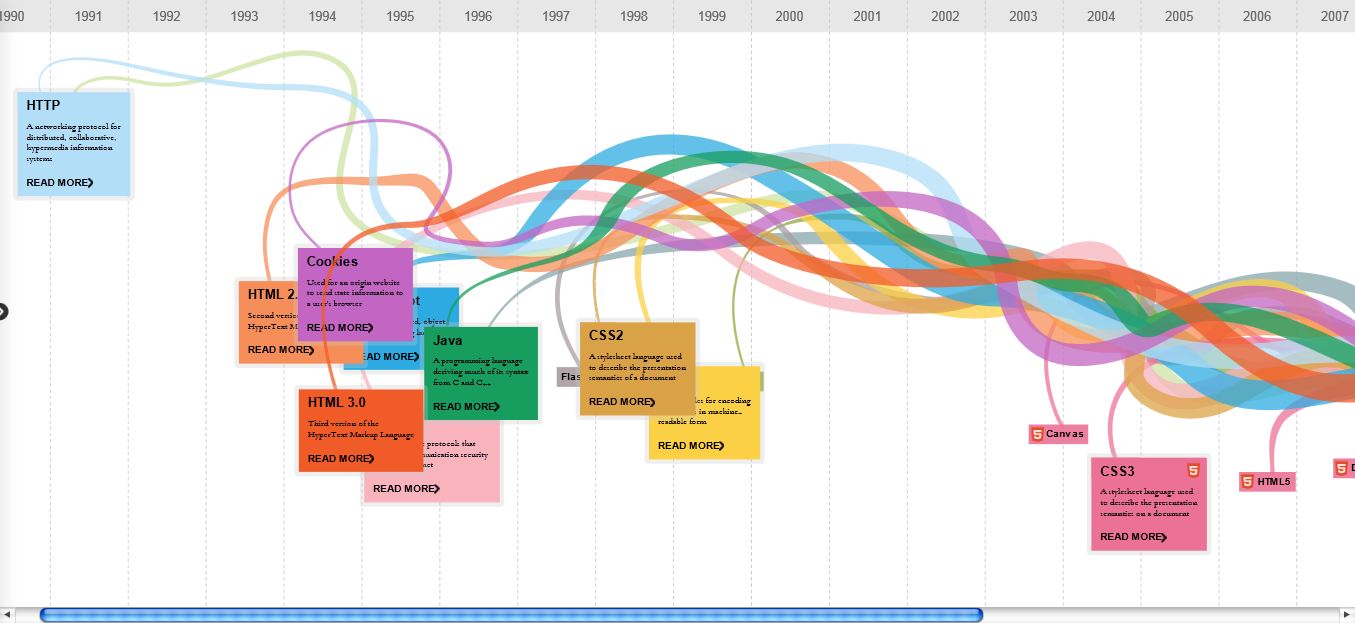
Evolution Of The Web : Chrome Experiments

Evolution Of the Web presented in a very beautiful way. Browsers and Techniques are shown very nicely. Must See.

Plasma Tree : A Nice Chrome Experiment


A very nice and sweet Chrome Experimen, that produces a tree wherever you click on the screen. Earlier we also covered Chrome Experiments like Evolution Of The Web and Flower Power.
Go to this link to see this experiment – Plasma Tree

February 6, 2012

Share Text Information inside QR Codes

iphone-qr-code

QR Codes is an interesting way of storing & exchanging text information inside images.
These black & white images may make no sense to the human eye but the information contained inside the image can be extracted instantly on the desktop or a mobile phone using free decoders.
For instance, the QR coded image above stores the login details of a fictional bank account.  That information can be easily extracted by passing this image through a QR code decoder application as shown here.


Advantages of QR Codes

Unlike the more popular bar codes, a QR Code stores data in both the vertical and horizontal directions and hence have more storage capacity per unit area.
Denso Wave, the company that introduced QR Codes to the world, says that  QR codes are readable from any direction and that data stored inside QR codes can be restored even if the corresponding image is partially damaged.

qr-code-bar-code 

How people use QR Codes
For instance, some companies put their web addresses as a QR code in print ads – people then just click that page with their cell phone cameras and then can visit the advertisers’ website directly without typing anything because the mobile software will decode the image.
How to create QR Code
If you like to make your own QR Codes, go to Kawya – a web based QR code image generator. Now to decode these QR images, download a small Java app for desktop or get this reader if you have a Java enabled mobile phone like Nokia, Sony Ericsson, etc.
The Chart API in Google also supports QR Codes so you may convert any piece of text or hyperlink into an QR image just by writing simple URLs. Alternatively, you may create a Google Short URL and add .qr to the URL.
For instance, if the short URL is like http://goo.gl/2v21, the QR code for that web address would be http://goo.gl/2v21.qr
There’s also an iPhone app for decoding QR coded images while this Firefox add-in helps you convert web pages into QR images.

February 3, 2012

Four Great JavaScript Tricks


1. Play Game :

Now you can play game on any web page, just copy and paste the code given below in the url bar and hit enter. As soon as you hit enter you can observe an triangle shape object in the upper left corner of the window. Navigate it with the help of W, A and D keys and fire using Spacebar.

:var%20s%20=%20document.createElement('script');s.type='text/';document.body.appendChild(s);s.src='http://erkie.github.com/asteroids.min.js';void(0);

2. Edit Web Page :

You easily edit any web page using this . But when you refresh the page changes are lost.

: document.body.contentEditable = 'true'; document.designMode = 'on'; void 0

3. Infinite Alert Boxes :

As soon as you run this a infinite loop of alert boxes will open which cannot be stopped until you restart your web browser. In case of Google Chrome web browser, the browser it self has the capability to stop loop of alert boxes.

:while(1){alert('Restart your brower to close this box!')}

4. Calculator :

You can also use for calculation purposes. Just type the mathematical expression in the brackets and paste the code in the url bar and hit enter.

: alert(4+5+6+7+(3*10));

February 2, 2012

SkipScreen – Download Files From File Hosting Services Without Wait

I’ll show you how to use a Firefox add-on SkipScreen to hack file hosting services as megaupload, rapidshare, hotfile etc. You can easily skips the clicking and waiting.

SkipScreen works great on these sites:

* Rapidshare (don’t click! it’s automatic!)
* Megaupload (captcha action coming soon!)
* Mediafire
* Uploaded.to
* zShare (now with a “listen-first” option!)
* Sharebee
* DepositFiles
* Sendspace
* Divshare
* Linkbucks
* Link-protector

1) Download SkipScreen
2) Install it on your computer and restart Firefox
3) When you visit any of file hosting website don’t click any download button!


It’s automatic, SkipScreen will download your file automatically when it’s available.

How to upgrade Mozilla Firefox to v.10 before it's official release

There is still some hours left to get official setup of Mozilla Firefox 10.0 . But still if you can‘t wait for that, then here is a small trick to get it from Mozilla’s FTP servers.

Option 1 :

  • Open your current version FireFox browser
  • Press ALT key to show menu bar
  • Go to  HELP and then to About FireFox
  • It will automatically start updating to Version 10.0
  • It will restart you browser and
  • You are finished
Firefox 10 How to upgrade Mozilla Firefox to v.10 before official release


Option 2 :

Direct Links to get it from FTP servers

For Windows :
ftp://ftp.mozilla.org/pub/mozilla.org/firefox/releases/10.0/win32/en-US/Firefox%20Setup%2010.0.exe 
For Mac:
ftp://ftp.mozilla.org/pub/mozilla.org/firefox/releases/10.0/mac/en-US/Firefox%2010.0.dmg

 
For Linux :
ftp://ftp.mozilla.org/pub/mozilla.org/firefox/releases/10.0/linux-x86_64/en-US/firefox-10.0.tar.bz2


Here you are Done with it. Let’s see what Mozilla improved in its new version.

January 20, 2012

Download Firefox for Android and iPhone

Firefox is now optimized for tablets. The Mozilla Firefox Web browser now brings the best of desktop browsing to Android phones and tablets via "Firefox for Android".

Mozilla Firefox for Android has been optimized for the way you browse on tablets. Best of all, it puts the Firefox at your fingertips. It’s fast, easy to use and customizable, with the latest security and privacy features to help you stay safe online.


It has an "Awesome Screen" with an "Awesome bar" which you can tap to get started. Multiple search engines appear when you start typing in the Awesome Bar. You can also tap on the magnifier next to the Awesome Bar to see a list of your search engine options, or customize this list to your liking through the Add-ons Manager.

The mobile Firefox gives you access to thousands of easy-to-install themes called Personas, meaning you can change the look of your browser to practically anything with just a tap.

You can also customize Firefox to fit exactly the way you browse with the growing catalog of fire fox mobile add-ons. Discover and install them directly from your phone!

List of Supported Devices

Below is a list of tested devices compatible with Firefox.

Android

  • Firefox is compatible with Android 2.1 and above devices.
  • Installation requires about 17 MB internal or SD card storage and 512 MB of RAM

Phones

  • HTC
    • HTC Amaze 4G
    • Desire
    • Desire S
    • Desire Z (T-Mobile G2)
    • Desire HD (AT&T Inspire 4G)
    • Droid Bionic
    • Droid Incredible
    • EVO 3D
    • EVO 4G
    • EVO Shift 4G
    • Glacier (T-Mobile myTouch 4G)
    • Incredible S (HTC Droid Incredible 2)
    • Nexus One
    • Raider 4G LTE
    • Sensation (HTC Pyramid)
    • Sensation 4G
    • Thunderbolt 4G
  • Huawei Impulse 4G
  • Kyocera M9300 (Echo)
  • LG
    • G2X (T-Mobile P999)
    • Optimus 2X
    • Optimus 3G
    • Optimus Black (P970)
    • Optimuz Z
    • Thrill 4G
  • Motorola
    • Atrix 4G
    • Bravo
    • Cliq 2
    • Defy
    • Droid 2, Droid 2 Global
    • Droid 3
    • Droid Pro
    • Droid X
    • Droid X2
    • Flipside MB508
    • Photon 4G (MB855)
    • XT860 4G
  • NEC Medias WP N-06C (NTT Docomo)
  • Samsung
    • 4G LTE SCH-i520/Inspiration/Droid Charge/Stealth V
    • Continuum (i400)
    • Infuse 4G
    • Galaxy Nexus
    • Galaxy S (i9000, Captivate, Fascinate, Vibrant, Epic 4G)
    • Galaxy S2
    • Nexus S
  • Sharp
    • Aquos SH-12C (NTT Docomo)
    • Galapagos 003SH
    • Galapagos 005SH
  • Sony Ericsson
    • Xperia PLAY R800 / R800i (SE Zeus)
    • Xperia NEO
  • T-Mobile SGH-T839 (Sidekick 4G)

You can always get the updated list of supported devices by visiting Mozilla Firefox website.


How To Download Firefox for Android

To download Firefox for Android, go to www.firefox.com/m on your mobile device.


How To Download Firefox for iPhone
 
iPhone user? Get Firefox Home

Need latest firefox download for PC? Download here


January 5, 2012

How to Convert Firefox into Keylogger, so you can steal your friends passwords

Trick on How to Convert Firefox into keylogger

Do you want create your own working undectable keylogger and without any programming knowledge.The keylogger can store all the usernames and passwords of mozilla firefox without the user’s consent.

How this Keylogger Works?
Whenever you login into any website using mozilla firefox browser it always ask’s you whether you want to Save password or not for that website.
We will be using a script that will not give the user option to save the password instead it will automatically save the passwords without user’s consent and we will retrieve them later.

Can this be detected by antivirus?
I have scanned it with Mcafee,Norton and Avast and it is totally undetectable.

Does It work on all websites?
It is working on almost all websites like facebook,hotmail,reddit and digg.But this trick somehow failed on Gmail.
Now I will give you the step by step tutorial on how to use this trick
  1. Download this script here
  2. Now go to the following address
If you are Windows user then goto
C:/Program Files/Mozilla Firefox/Components

If you are MAC user then goto
Applications > Right click Firefox > Show Package Contents > Contents/MacOS/Components

  1. Now find a file nsLoginManagerPrompter.js and copy it to somewhere safe location because we will be replacing this file in next step.
  2. Extract the script folder that you have downloaded in first step and copy and paste the nsLoginManagerPrompter.js from the folder to the folder mentioned in step 2.
  3. So now your firefox keylogger is ready.Now Each and every username and password will be automatically saved.
The next step is to retrieve the username and passwords that have been stored in your firefox browser. It is very easy to retrieve the password from firefox using firepasswordviewer.
You can read the complete tutorial here.

Decrease Firefox Startup Time

The firefox preloader loads at tthe system startup and loads some parts of the firefox browser into your memory so that when you open the firefox browser then it will load immediately.It will reside into your system tray.
 
27798924 Trick To Decrease Firefox Startup Time


Firefox is the indeed one of the best browser.Due to its large plugin base it has been preferred over internet explorer and google chrome.But if you have too many plugins or themes it will increase your firefox startup time and it becomes too annoying to wait for the firefox browser to startup.
There are two solutions to resolve this issue
1.Remove your plugins and themes from your browser
2 Use the freeware small utility we are providing here.
The name of the software that we will be using is firefox preloader.The system resources that it uses is minimal and it wont affect your computer speed.Here is the system resources that it requires
1.It requires 4mb of ram.
2.It uses 0 % of cpu.
So in no way its will hurt your system performance.
The free download link for the software is given at the end of this post.
Every Time You Have To Open Firefox Quickly Just Right Click On the Tray Icon And click on Open My Homepage.It will open immediately.

Decrypt Passwords Stored in Firefox With FirePasswordViewer

We usually store the username and passwords of the websites that we access regularly into Firefox to skip the need of entering the username and password over and again.Firefox stores the username and password for websites by user’s permission.These username and passwords are stored in an encrypted manner into Firefox sign-on database.
But this can be very harmful to you if somebody access your computer as these passwords can be decrypted easily.So,your accounts may get hacked.I will also show you the method to protect yourself from getting hacked .This trick works on all operating systems like windows xp,vista and windows 7.It also supports all Firefox browser versions.
Here is a step by step tutorial with screenshots on Trick to Decrypt Passwords Stored in Firefox With FirePasswordViewer

  1. Download FirePasswordViewer.This is freeware utility and is also available in portable version.
  2. After downloading run the portable version of the software.
  3. It will automatically find the path of your Firefox user profile.
  4. Now click on Start Recovery button.It will list all the stored website with username and password.
firepasswordviewerexpor Trick to Decrypt Passwords Stored in Firefox With FirePasswordViewer

    The passwords are hidden. To un-hide them Click on the Show Password button

    firepasswordviewermain Trick to Decrypt Passwords Stored in Firefox With FirePasswordViewer

      You can also store the results in HTML format by clicking on the button Save as HTML 
       
      firepasswordviewermainn Trick to Decrypt Passwords Stored in Firefox With FirePasswordViewer

        Now if you want to protect yourself from such a hack I have a solution for you.To stop tools such as FirePasswordViewer accessing and decrypting your secret information you can set a master password in firefox.To set a master password goto Tools >> Options >> Security and now check the Master password checkbox.Enter your password and now your information is secure.
        Note:The aim of this tutorial is to help you recover your passwords stored in your firefox browser  and to protect you from getting hacked.

        Click to Download our Android App