March 3, 2012

Run commands List


  • Accessibility Options : access.cpl
  • Add Hardware : hdwwiz.cpl
  • Add / Remove Programs : appwiz.cpl
  • Administrative Tools : control admintools
  • Automatic Updates : wuaucpl.cpl
  • Wizard file transfer Bluethooth : fsquirt
  • Calculator : calc
  • Certificate Manager : certmgr.msc
  • Character : charmap
  • Checking disk : chkdsk
  • Manager of the album (clipboard) : clipbrd
  • Command Prompt : cmd
  • Service components (DCOM) : dcomcnfg
  • Computer Management : compmgmt.msc
  • DDE active sharing : ddeshare
  • Device Manager : devmgmt.msc
  • DirectX Control Panel (if installed) : directx.cpl
  • DirectX Diagnostic Utility : dxdiag
  • Disk Cleanup : cleanmgr
  • System Information : dxdiag
  • Disk Defragmenter : dfrg.msc
  • Disk Management : diskmgmt.msc
  • Partition manager : diskpart
  • Display Properties : control desktop
  • Properties of the display (2) : desk.cpl
  • Properties display (tab "appearance") : control color
  • Dr. Watson : drwtsn32
  • Manager vérirficateur drivers : check
  • Event Viewer : Eventvwr.msc
  • Verification of signatures of files : sigverif
  • Findfast (if present) : findfast.cpl
  • Folder Options : control folders
  • Fonts (fonts) : control fonts
  • Fonts folder windows : fonts
  • Free Cell : freecell
  • Game Controllers : Joy.cpl
  • Group Policy (XP Pro) : gpedit.msc
  • Hearts (card game) : mshearts
  • IExpress (file generator. Cab) : IExpress
  • Indexing Service (if not disabled) : ciadv.msc
  • Internet Properties : inetcpl.cpl
  • IPConfig (display configuration) : ipconfig / all
  • IPConfig (displays the contents of the DNS cache) : ipconfig / displaydns
  • IPConfig (erases the contents of the DNS cache) : ipconfig / flushdns
  • IPConfig (IP configuration cancels maps) : ipconfig / release
  • IPConfig (renew IP configuration maps) : ipconfig / renew
  • Java Control Panel (if present) : jpicpl32.cpl
  • Java Control Panel (if present) : javaws
  • Keyboard Properties : control keyboard
  • Local Security Settings : secpol.msc
  • Local Users and Groups : lusrmgr.msc
  • Logout : logoff
  • Microsoft Chat : winchat
  • Minesweeper (game) : winmine
  • Properties of the mouse : control mouse
  • Properties of the mouse (2) : main.cpl
  • Network Connections : control NetConnect
  • Network Connections (2) : ncpa.cpl
  • Network configuration wizard : netsetup.cpl
  • Notepad : notepad
  • NView Desktop Manager (if installed) : nvtuicpl.cpl
  • Manager links : packager
  • Data Source Administrator ODBC : odbccp32.cpl
  • Screen Keyboard : OSK
  • AC3 Filter (if installed) : ac3filter.cpl
  • Password manager (if present) : Password.cpl
  • Monitor performance : perfmon.msc
  • Monitor performance (2) : perfmon
  • Dialing Properties (phone) : telephon.cpl
  • Power Options : powercfg.cpl
  • Printers and Faxes : control printers
  • Private Character Editor : eudcedit
  • Quicktime (if installed) : QuickTime.cpl
  • Regional and Language Options : intl.cpl
  • Editor of the registry : regedit
  • Remote desktop connection : mstsc
  • Removable Storage : ntmsmgr.msc
  • requests the operator to removable storage : ntmsoprq.msc
  • RSoP (traduction. ..) (XP Pro) : rsop.msc
  • Scanners and Cameras : sticpl.cpl
  • Scheduled Tasks : control schedtasks
  • Security Center : wscui.cpl
  • Console management services : services.msc
  • shared folders : fsmgmt.msc
  • Turn off windows : shutdown
  • Sounds and Audio Devices : mmsys.cpl
  • Spider (card game) : spider
  • Client Network Utility SQL server : cliconfg
  • System Configuration Editor : sysedit
  • System Configuration Utility : msconfig
  • System File Checker (SFC =) (Scan Now) : sfc / scannow
  • SFC (Scan next startup) : sfc / scanonce
  • SFC (Scan each démarraget) : sfc / scanboot
  • SFC (back to default settings) : sfc / revert
  • SFC (purge cache files) : sfc / purgecache
  • SFC (define size CAHC x) : sfc / cachesize = x
  • System Properties : sysdm.cpl
  • Task Manager : taskmgr
  • Telnet client : telnet
  • User Accounts : nusrmgr.cpl
  • Utility Manager (Magnifier, etc) : utilman
  • Windows firewall (XP SP2) : firewall.cpl
  • Microsoft Magnifier : magnify
  • Windows Management Infrastructure : wmimgmt.msc
  • Protection of the accounts database : syskey
  • Windows update : wupdmgr
  • Introducing Windows XP (if not erased) : tourstart
  • Wordpad : write
  • Date and Time Properties : timedate.cpl

All Mobiles Secret Codes


Samsung Secret Codes

  • Software version: *#9999#
  • IMEI number: *#06#
  • Serial number: *#0001#
  • Battery status- Memory capacity : *#9998*246#
  • Debug screen: *#9998*324# - *#8999*324#
  • LCD kontrast: *#9998*523#


LG Secret Codes
  • LG all models test mode: Type 2945#*# on the main screen.
  • 2945*#01*# Secret menu for LG
  • IMEI (ALL): *#06#
  • IMEI and SW (LG 510): *#07#
  • Software version (LG B1200): *8375#
  • Recount cheksum (LG B1200): *6861#
  • Factory test (B1200): #PWR 668
  • Simlock menu (LG B1200): 1945#*5101#
  • Simlock menu (LG 510W, 5200): 2945#*5101#
  • Simlock menu (LG 7020, 7010): 2945#*70001#


Motorola Secret Codes
  • IMEI number:
  • *#06#
  • Code to lock keys. Press together *7
  • Note: [] (pause) means the * key held in until box appears.
  • Select phone line - (use this to write things below the provider name):
  • [] [] [] 0 0 8 [] 1 []
  • Add phonebook to main menu:
  • [] [] [] 1 0 5 [] 1 []


Nokia Secret Codes
  • *#06# for checking the IMEI (International Mobile Equipment Identity).
  • *#7780# reset to factory settings.
  • *#67705646# This will clear the LCD display(operator logo).
  • *#0000# To view software version.
  • *#2820# Bluetooth device address.
  • *#746025625# Sim clock allowed status.
  • *#62209526# - Display the MAC address of the WLAN adapter. This is available only in the newer devices that supports WLAN.

How to copy content from Right click disabled web pages

Sometimes it is not possible to copy something that want from a web page (if the Webmaster has disabled the right click). To go round this problem all you have to Do is to go to the menu bar at the top of your browser, click on “View” then “Page Source” and you should be able to copy the text from there.

So you copied content finally. Don’t misuse this content, because it is violating the copyrights. Ofcourse even they can restrict this one also but many webmaster don’t know this one.

How to view page source in google chrome

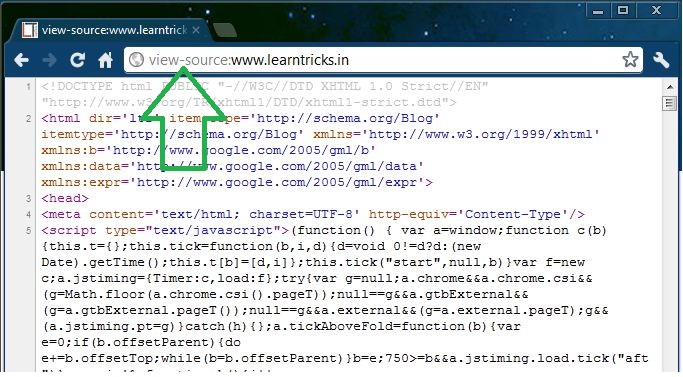
Google Chrome normally opens the source view of the web page in its own new tab. To see a web page’s souce code you have to normally right-click on the page and choose “View Page Source”. If you prefer to spend most of your time on the keyboard and wanted to avoid extra mouse clicks then Google Chrome has a nice lilttle shortcut to get to the web page source code quickly.
Open a new tab in Google Chrome and type-in :

view-source:the-web-address

like for example : “view-source:www.learntricks.in”

Is it possible to disable the battery replacing alert in Windows7 ?

Are you getting the error message “Consider replacing your battery” in Windows 7 too often? Microsoft is already looking into the battery issues with Windows 7 and will soon provide a solution for the problem. In the meantime, you might want to try this temporary fix that will disable the error message.
Microsoft reported that the tool that is retrieving the battery status works flawlessly and they can’t explain why it is not working as it should. Many Windows 7 users say that sometimes their laptop even gets shutdown after 30 minutes, although they were using a completely refreshed battery. The Redmond-based company is now investigating this case with the help of 3rd-party developers.

Temporary Fix/Solution


1. Open up the Control Panel:

Windows 7 Control Panel

2. Uncollapse “Batteries” and disable or uninstall “Microsoft ACPI Compliant Control Method Battery”/>

DIsable Microsoft ACPI Compliant Control Method Battery 


 Another Solution

It could help to avoid automatic switching off and keep the information about battery charge:
Setup Critical battery action to 'Do Nothing'
The tool is powercfg.exe
To change the 'Battery->Critical battery action->'On battery' setting to "Do nothing" using powercfg.exe

1. activate the power scheme you want to modify.
2. open an elevated command console (windows key, type 'cmd' in start menu, press "ctrl+shift+enter", click 'continue')
3. execute "powercfg -setdcvalueindex SCHEME_CURRENT SUB_BATTERY BATACTIONCRIT 0"
4. your current power scheme will show "Battery->Critical battery action->On battery: Do nothing" despite the option being unavailable in the drop box.

 If still the problem remains then try these

  1. Update the BIOS software on the computer 
  2. Install the latest updates from Microsoft 


Click to Download our Android App