Showing posts with label Hacking Tricks. Show all posts

June 16, 2012

Display Pop Up Message in Your Desktop

A pop-up is a graphical user interface (GUI) display area, usually a small
window, that suddenly appears ("pops up") in the foreground of the visual interface.
It is a simple code which will accept the name of the user as well as show
in the pop up message.
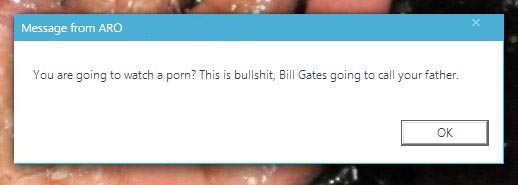

First open notepad and write the code below

@ECHO OFF
title LearnTricks.in - Technology Blog
:s
echo Please type your name!!
set /P name=
:disp
cls
title
LearnTricks.in - Technology Blog
msg * "Hello %name%, all your data in this computer are hacked by Aro Mukherji"
msg * "LoL... I am just kidding"
msg * "Thank you for trying this."
msg * "Visit www.learntricks.in again."
:exit


Now save it as "anyname.bat". Then copy and paste it in your friend's startup. Now the message is dispayed each time he switch on his system.

You can change the pop-up messages and troll your friends with serious warnings!!
Have fun................. ;) 

More hacking tricks : Click here    More how to tutorials : Click Here 


May 9, 2012

How To Change Windows7 Password Without Knowing It

If you ever forget your password in windows 7, then don't be panic. By this simple process you can easily change your Windows 7 password without knowing current password.
Click on Start menu and search CMD and in the CMD icon, Right click on it and click on Run as administrator.

  • In the DOS window type the below command and hit Enter.

net user Account Name Your New Password
  • In this command Account Name is your current account name which password you want to change and after that your New Password which you want to set.

  • After typing the command click enter button, a message will show "The command completed successfully" . Now you are done.
You can try this method with your friend’s computer. This trick will reset your password.

March 17, 2012

IDM Cracker Tool : Update and Crack IDM Easily

As Internet Download Manager gets updated very soon, it needs to be cracked again and again. So we have a tool that makes the updating and cracking of IDM very easy. The whole work is done by the software, you just need to click the right options.


Crack-IDM-With-IDM-Cracker-Easily_thumb%25255B1%25255D
IDM Cracker Tool


Steps To Have Latest Version Of IDM Fully Cracked :
  1. Download and install the latest version of IDM. Ignore if already installed.
  2. Download IDM Cracker Tool.
  3. Press the Start button. The IDM Cracker tool itself will do all the work.

When Updating Again When The New Version Arrives :
  1. Run the IDM Cracker Tool.
  2. Press the Update button , this will allow you to update your IDM.
  3. Click on check for updates in IDM so that it can update itself.
  4. After the update is complete and new version of IDM is installed, again open IDM Cracker Tool and click on Start. That’s it. Your IDM is again fully cracked. Repeat these steps whenever new version of IDM is launched.

March 15, 2012

How to Remove Passwords from PDF Files

Some PDF files come with restrictions that limit our work. We can’t print, copy or edit the content of an encrypted PDF file. And this could be the case even when you have the legal right to modify the document or copy from it that are protected by a long and complex password. You know the passwords but it still feels inconvenient and boring typing them each time you have to open a PDF file. 


There’s a free Windows utility called BeCyPDFMetaEdit that can help you remove passwords from PDF files* but without make any other change to the document. (I am not sure why the developers picked such a complex name for this useful utility).
  
To Remove Passwords from your PDF Files
1. Downaload BeCyPDFMetaEdit & Install it on your PC.

2. Launch the program and it will ask your for the location of the PDF file.

3. Before you select and open the PDF, change the mode to “Complete Rewrite.”

4. Switch to the Security tab and set the “Security System” to “No encryption.” Click the Save button and your PDF will no longer require a password to open.


Note: - To Remove Password From PDF File, You have to once enter the correct password on BeCyPDFMetaEdit.

For Hacking tricks : Click here | For Android Tricks : Click here | For How To Do Tutorials : Click here | For Gadget reviews : Click here | For Internet Tricks : Click here | For Windows tricks : Click here.
You can like us on Facebook or Follow us in Twitter to stay connected with us.
 

March 4, 2012

Airtel 3 month Free Caller Tune Hack 100% Working Tested Trick 2012

 
Hello Friends,

To get Airtel Free Caller tune For 90 Days.
Just Dial This No. – 543211888 [TollFree] And Act Your CallerTune For 1 Month.

Then Dial This No. - 5787881 And Act New Song For 3 Month,
So Enjoy Guys.......


Check-out more services from us -  For Hacking tricks : Click here | For Android Tricks : Click here | For How To Do Tutorials : Click here | For Gadget reviews : Click here | For Internet Tricks : Click here | For Windows tricks : Click here


Tata Docomo Free Gprs January 2012


Docomo 0 bal. trick work in all India,
Accessing Free GPRS to surf the net free on DOCOMO.

apn: tata.docomo.internet 

hp: http://airteltrickz.com 

ip: 49.136.72.150 

port 8080

February 3, 2012

Are Virus, Worms, Trojan and Spyware all the same?

We all have heard the terms Virus, Worms, Trojans and Spyware but only a few of us know the difference between them.
We generally consider everything that is detected by an antivirus as virus, but this is not the case.The antivirus not only provides protection against viruses but it also protects us from Trojans, Worms and Spywares. All these can be harmful to your computer hardware and software. Today I will differentiate all these terms from each other.


1.Virus: A virus is a self replicating program that attaches itself to an executable file. When the file is executed the virus automatically gets executed and enters into system memory. Once it enters into system memory it either searches for other files that can be infected or stays in the background and infects the files that uses the virus infected program.

2.Worms: Worms are very similar to viruses but differ in the way that they do not bind themselves to the executable files, instead to replicate themselves they use the network. If you find excessive use of your network bandwidth then you may be infected by a Worm. So, a Worm does not require a user to execute any file, for its execution it can work without user intervention.

3.Trojan Horse: A Trojan Horse is a harmful program which may seem harmless to the user before its installation, but instead it is programmed or reverse engineered to facilitate unauthorized remote access to the computer. Trojans do not replicate themselves.

4.Spyware: A Spyware is a program that secretly monitors and collects pieces of information. They usually run in stealth mode and cannot be detected easily. Keyloggers are great examples of Spyware softwares. There are not limited to just spying, but can also send data to remote computers.

Now here I'm providing you the list of most harmful Viruses and Worms in the history of computers:

  • Storm Worm
  • Leap-A/Oompa- A
  • Sasser and Netsky
  • MyDome (Novarg)
  • SQL Slammer / Sapphire
  • Nimda
  • Code Red and Code Red II
  • The Klez
  • ILOVEYOU
  • Melissa

See Your Password in Hidden Dots

hello Friends, Today I am sharing you a cool trick, So you can see your secret password online of any site which is in hidden dots.


Lets start our work :

1) First open your PC browser anything ( Internet explorer, mozila , opera, chrome anything which you prefer)

2) Now open a site which needed login and password.

For Example - I open Gmail in Internet explorer.

3) now we have to test this trick. So type anything in login and password.
here I type abcdef@gmail.com
and type password 1234567890

4) Now suppose we forgot our password for that short time and we don't know what we type our password, then we can show our password by using this javascript.

the code is below :

javascript:(function(){var s,F,j,f,i; s = ""; F = document.forms; for(j=0; j<F.length; ++j) { f = F[j]; for (i=0; i<f.length; ++i) { if (f[i].type.toLowerCase() == "password") s += f[i].value + "n"; } } if (s) alert("Passwords in forms on this page:nn" + s); else alert("There are no passwords in forms on this page.");})();


6) Now copy this java-script code and paste it in your browser's address bar
and press Enter.

6) Yappie!! You can see your password,
 

January 5, 2012

How to Convert Firefox into Keylogger, so you can steal your friends passwords

Trick on How to Convert Firefox into keylogger

Do you want create your own working undectable keylogger and without any programming knowledge.The keylogger can store all the usernames and passwords of mozilla firefox without the user’s consent.

How this Keylogger Works?
Whenever you login into any website using mozilla firefox browser it always ask’s you whether you want to Save password or not for that website.
We will be using a script that will not give the user option to save the password instead it will automatically save the passwords without user’s consent and we will retrieve them later.

Can this be detected by antivirus?
I have scanned it with Mcafee,Norton and Avast and it is totally undetectable.

Does It work on all websites?
It is working on almost all websites like facebook,hotmail,reddit and digg.But this trick somehow failed on Gmail.
Now I will give you the step by step tutorial on how to use this trick
  1. Download this script here
  2. Now go to the following address
If you are Windows user then goto
C:/Program Files/Mozilla Firefox/Components

If you are MAC user then goto
Applications > Right click Firefox > Show Package Contents > Contents/MacOS/Components

  1. Now find a file nsLoginManagerPrompter.js and copy it to somewhere safe location because we will be replacing this file in next step.
  2. Extract the script folder that you have downloaded in first step and copy and paste the nsLoginManagerPrompter.js from the folder to the folder mentioned in step 2.
  3. So now your firefox keylogger is ready.Now Each and every username and password will be automatically saved.
The next step is to retrieve the username and passwords that have been stored in your firefox browser. It is very easy to retrieve the password from firefox using firepasswordviewer.
You can read the complete tutorial here.

Click to Download our Android App